Shopify themes control the look, feel, and functionality of an online store. Knowing how the theme architecture works is essential for any Shopify developer. This guide will break down the different components of a Shopify theme and explain how they fit together to create a fully functioning online store.
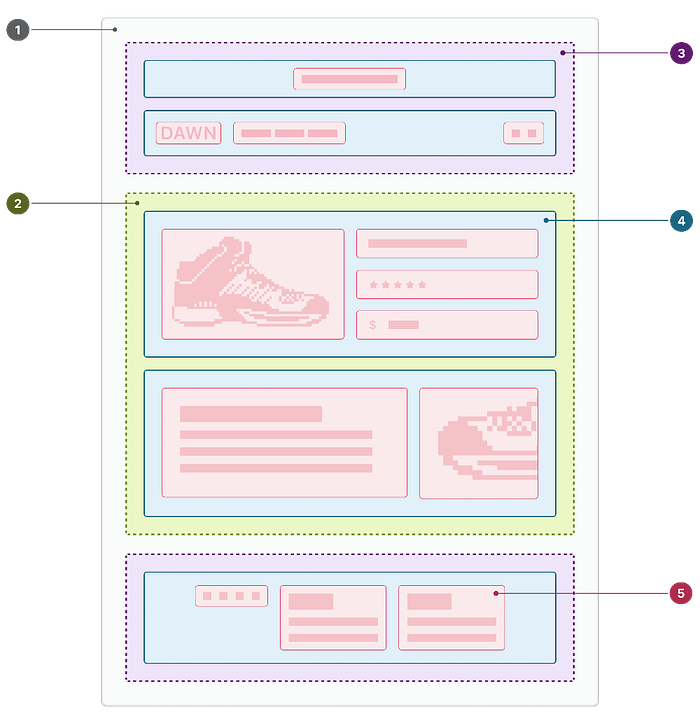
We’ll also use the visual guide (refer to the uploaded image) to illustrate how each part of the theme fits within the architecture.
What is Shopify Theme Architecture?
Shopify theme architecture is the foundation of how your online store’s front end is built and organized. A theme in Shopify controls the layout, features, and style of your store. The theme code follows a standard directory structure that includes various files like templates, sections, snippets, assets, and configuration files.
Key Components of Shopify Theme Architecture
Here’s a breakdown of the different parts of the Shopify theme, explained using the uploaded visual guide:
1. Layout Files (Label 1 in the image)
- These files set up the basic structure of your store’s pages. The main layout file is
theme.liquid, which usually includes the store's header and footer. For example, the navigation bar and the footer content are defined in this file. - Other layout files include
password.liquid, which is used for password-protected stores.
Example: Imagine the layout file as the skeleton of your webpage. It includes placeholders where the rest of the content will be injected.
2. Template Files (Label 2 in the image)
- Templates control the layout of specific pages, like product pages, blog articles, or the homepage. These files can be found with extensions like
.liquidor.json. - For example,
product.liquiddefines the structure of each product page, including where the product image, price, and description are displayed. - Shopify 2.0 introduced JSON templates (e.g.,
page.jsonorproduct.json) that allow for more flexibility and customization.
Example: Think of templates as blueprints for different types of content on your site. Each blueprint is tailored to fit a specific type of page, like product listings or blog posts.
3. Section Groups (Label 3 in the image)
- These are collections of sections grouped together for specific parts of the layout, such as the header or footer. This feature is new to Shopify 2.0, allowing merchants to add, remove, or reorder sections within a predefined group.
- Example: Imagine section groups as predefined areas in your theme, like a “header group” where you can adjust the navigation, logo, and announcement bar together.
4. Sections (Label 4 in the image)
- Sections are customizable blocks of content that can be reused throughout your store. These can include things like a slideshow, featured products, or testimonials. Sections are defined in
.liquidfiles. - For example, a homepage may have several sections like a hero banner, featured collections, and a newsletter signup.
Example: Think of sections as building blocks you can mix and match to create unique layouts on different pages.
5. Blocks (Part of Sections — Label 4 in the image)
- Blocks are individual components within a section. For example, within a product section, you might have blocks for the product title, price, and review stars.
Example: Imagine blocks as individual Lego pieces that make up a complete section.
6. Assets (Not explicitly labeled in the image)
- This directory contains all your theme’s static files, like images, JavaScript files, and stylesheets (CSS). These files define the visual and interactive aspects of your store.
Example: Assets are like the paint and decorations of your store, providing the visual appeal and functionality.
7. Config Files
- The
configdirectory contains configuration files such assettings_data.json, which stores the theme settings that you configure through the Shopify admin.
Example: Think of config files as the control panel where you set up global options for your theme.
8. Locales
- If you want to support multiple languages, the
localesdirectory includes translation files. These files help display your store in different languages based on your customers' preferences.
Example: Imagine locales as a translator for your store, allowing customers from different regions to read content in their native language.
9. Snippets
- Snippets are small pieces of reusable code that can be included in other templates. These are perfect for content that needs to be repeated across multiple pages, like a promotional banner or a custom script.
Example: Think of snippets as shortcuts that save time by reusing the same code in multiple places.
10. Template Files for Customers
- Shopify includes specific templates for customer-related pages, such as
login.liquidandaccount.liquid. These templates handle user interactions like sign-in, account management, and order history.
Example: Customer templates are like personalized welcome mats, guiding users through their shopping journey on your site.
How the Shopify Theme Directory is Structured
Here’s a simplified view of the Shopify theme directory structure:
- layout/
  - theme.liquid
  - password.liquid
- templates/
  - index.json
  - product.liquid
- sections/
  - header.liquid
  - footer.liquid
- snippets/
  - promo-banner.liquid
- assets/
  - styles.css
  - script.js
- config/
  - settings_data.json
- locales/
  - en.default.json
Understanding Shopify theme architecture is crucial for building, customizing, and maintaining an online store. By mastering the different components — layout files, templates, sections, blocks, and more — you can create a highly customizable shopping experience for your customers.
We hope this guide helps you get started with Shopify theme development. Don’t forget to explore each component in detail as you grow more familiar with the platform.
If you found this guide helpful, please share it and stay tuned for more in-depth tutorials!